Transitions
TODO:
there’s a helper script to automatically generate these transitions value., should be referenced and used here. Manual version should be kept for completeness.
Finally, we are up to transitions. These are the oGotoRoom objects that allow you to go to other rooms, and they take quite a bit of time to prepare to be visually appealing. Bad transitions end up with teleporting Samuses across the screen and the camera moving strangely. However, with the right knowledge, it can be done very quickly. Each transition requires a lot of number fiddling in the creation code. The essential values needed are: targetroom, direction, height, targetx, targety, camstartx, camstarty, transitionx, transitiony.
Here’s a description of what you should assign to them:
targetroom= The room number of the room you are transitioning into. Entering the name of the room will automatically make UTMT convert it into its number ID.direction= A number for what direction Samus is travelling in.0for Right.90for Up.180for Left.270for Down.height= The size of the transition. Depends ondirection. If the transition is going Right or Left, this number is how tall the transition is. This means the optimal location to place the transition is at the bottom of the entrance, directly on a collision block. If the direction is going Up or Down, this variable is how wide the transition is, starting from its origin (its centre) going towards the right. Optimal placement is placing this directly on the right of the leftmost wall the transition is between.targetx= The x coordinate of where Samus is in the next room you are transitioning to.targety= The y coordinate of where Samus is in the room you are transitioning to.camstartx= The x coordinate of the camera’s centre in the next room.camstarty= The y coordinate of the camera’s centre in the next room.transitionx= x coordinate of where Samus is during the transition cutscene relative to the camera’s origin. This has a range of 0-320. Do not go above or below it.transitiony= y coordinate of where Samus is during the transition cutscene relative to the camera’s origin. This has a range of 0-240. Do not go above or below it.
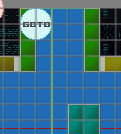
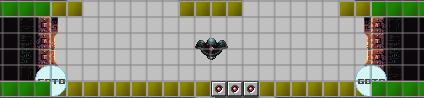
targetroom and targetx and targety and direction set, the transition should now work.
Next are some tips to help smoothen out the transition:
targetxandtargety= If Samus is in the air, try use the x and y coordinates of the floor tile you want her to end up on after the cutscene. Since the floor tiles have origins on the top-left of their image, and Samus will end up on them and not in the air above them.camstartxandcamstarty= After testing the transition cutscene once, I try and find the midpoint of where it is on my screen in-game in reference to any nearby tiles or objects. This will take some trial and error to get right.transitionxandtransitiony= This will also take some trial and error to get right. Essentially what I do is I take the midpoint and I either subtract or add a quarter of the room size’s x and y values depending on where I want Samus to end up in during the transition before actually going through it. After going through the transition, and finding out how terribly Samus is offset, I add or subtract from the values by 16 (essentially one block) to help get closer to the preferred final destination of where Samus is during the cutscene. This is easier to understand in practice, hopefully.
Congratulations! You have a functional room with transitions, collision units, tiles, background, and a camera! Feel free to add your own objects in and whatever you feel is necessary.