Basics
As UndertaleModTool mods GameMaker games, having GameMaker resources up at hand is often times very useful. Here are manuals for a few versions:
- GameMaker Studio 1.4: https://dobby233liu.github.io/gms1.4docs-recreation/
Relevant for AM2R versions 1.5.5 and earlier. - GameMaker Studio 2.2: https://dobby233liu.github.io/gms2.2docs/
Potentially relevant for AM2R version 1.6. - Latest GameMaker: https://manual.yoyogames.com/
Shouldn’t have any relevancy to AM2R for now, but it’s good keeping in mind. The site automatically updates to changes of newer GamerMaker versions.
A GameMaker game is split into multiple different resources, which all can be named.
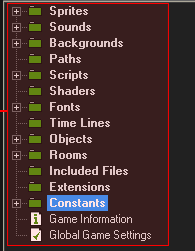
These are collection of images. A sprite can have multiple subimages (frames), which can create an animation. They can be attached as a visual representation of objects, or drawn directly.
These are audio clips. They can be embedded inside the game, or loaded from disk, and also have different compression option. You usually adjust these based on whether you want a sound asset to play a short sound effect, or music.
These are large non-animated images. It’s worth noting, that in GameMaker Studio 1.4, tilesets are also just backgrounds.
These are lines defined by X and Y coordinates. AM2R does not use these, but it’s useful to know about them.
These are essentially code entries that you can call anywhere. GameMaker does not otherwise allow you to name your own functions (although later versions of GameMaker have implemented that functionality)
These are small pieces of code that run on the GPU to modify how pixels are drawn on the screen. These are programmed in different shader languages, usually GLSL ES.
As the name suggests, these are fonts. They’re implemented slightly differently as one would usually think - you have to define which characters you want to include at which size, and GameMaker will then store images of the characters at your defined sizes.
These allow you to have code run after a specific amount of time has passed.
These are essentially “actors”, or if you’re coming from other programming languages, you can think of them as “Classes”. An object has certain attributes: the sprite it uses, whether it’s visible, the code it executes when certain events happen and so on. You are then able to place instances of them into rooms. Imagine the object like a blueprint, and the instances like a creation from that blueprint.
These are seperately defined spaces in your game. They have a width, height, and can have instances of objects, tiles, backgrounds and more.
These are essentially externally defined libraries. If you had written a small set of useful string manipulation methods, you were able to use them as extensions in your projects, rather than redefine them every time. AM2R doesn’t use any, and most GameMaker projects will usually not use any due to the complications they bring.
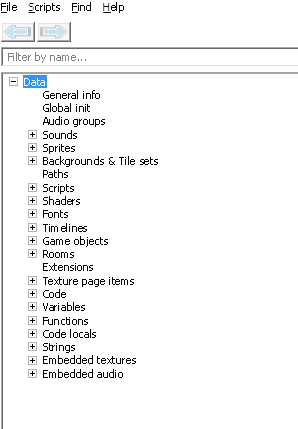
In addition, UndertaleModTool also exposes some internal resources.
TODO:
explain the rest. texture page items, code, variables, functions, code locals, strings, embedded textures and audio
GameMaker games are coded in GML (GameMaker Language), whose syntax is similar to JavaScript. There are a few places where you can use it:
- Scripts: More or less user defined functions.
- Events: Objects can have specific moments (events), that will run code.
- Creation Code: Code that gets run when rooms get loaded or when object instances get created.
For new GML coders, it’s recommended to read the GML Overview in order to get familiar with the language.
It is worth noting, that when dealing with code in UndertaleModTool, there are a few things to look out for. It tries to decompile and and compile code from GML into bytecode. However, it doesn’t work perfectly, so (de)compiling errors may happen. UndertaleModTool compiling the code also means that some code elements (like whitespace, comments or some if expressions) will be optimized away.